Instagram Font Generator
Instagram Font Generator helps you create stylish, eye-catching text for Instagram bios, captions, usernames, comments, and posts. Choose from a variety of cool, aesthetic, fancy, and unique font styles, then copy and paste your favorite text directly into Instagram. No app or installation is needed.
Why Your Instagram Text Style Actually Matters
First impressions happen fast on social media—often in under two seconds. While great photos and videos grab attention in the feed, your bio is what convinces someone to hit “Follow.” A normal, plain bio doesn’t stand out and is easy to ignore. A creatively styled one makes people stop and look twice.
That’s where font generators come in. Instead of settling for Instagram’s standard text, you can bring in bold lettering, flowing cursive, outlined characters, or even quirky glitch-style text—all without touching a single design app.
What Exactly Are Instagram Fonts?
The phrase “Instagram fonts” can be a little misleading. Instagram itself doesn’t let users install custom fonts the way a website designer would. What you’re actually working with are Unicode text symbols—characters that already exist within the global text standard and happen to visually resemble different font styles.
Unicode is the international system that defines how text is stored and displayed across all modern devices and platforms. It includes many more characters than just the usual A–Z letters. Within its vast library of characters, you’ll find symbols that look bold, italic, cursive, outlined, or even upside down. A font generator strings those characters together to recreate the look of a custom typeface.
Because these are true text characters rather than images or design files, they can be freely copied and pasted across any platform that supports Unicode encoding. That means they work not just on Instagram but across Twitter, Facebook, TikTok, YouTube, Discord, WhatsApp, and most other platforms.
Popular Font Styles You Can Generate
Cursive / Script Fonts
These flowing, handwritten-style characters add elegance and personality to bios and captions. Great for lifestyle brands, travel accounts, and personal profiles.
Bold Text
Thick, attention-grabbing letters work well for headlines, key phrases, or anything you want people to notice first. Especially effective in longer captions where you want to break up the text.
Bubble Text
Circular, rounded letters with a playful, eye-catching quality. Perfect for fun or youthful brand voices, giveaway posts, and light-hearted content.
Outline / Hollow Fonts
Clean and modern, these open-letter styles are popular for minimalist aesthetics and sleek personal brands.
Small Caps
ALL-CAPS text scaled to lowercase height. Gives captions a polished, editorial look without feeling aggressive.
Glitch / Zalgo Text
Chaotic, layered characters with a digital-distortion effect. Best used sparingly for creative or avant-garde accounts—note that Instagram occasionally filters heavily decorated glyphs.
Strikethrough Text
Crossed-out letters used for humor, corrections, or stylistic contrast in captions.
Upside-Down Text
Exactly what it sounds like—flipped characters that create curiosity and stop the scroll.
Aesthetic / Vaporwave Fonts
Wide-spaced, dreamy text styles are popular with aesthetic, art, and photography accounts.
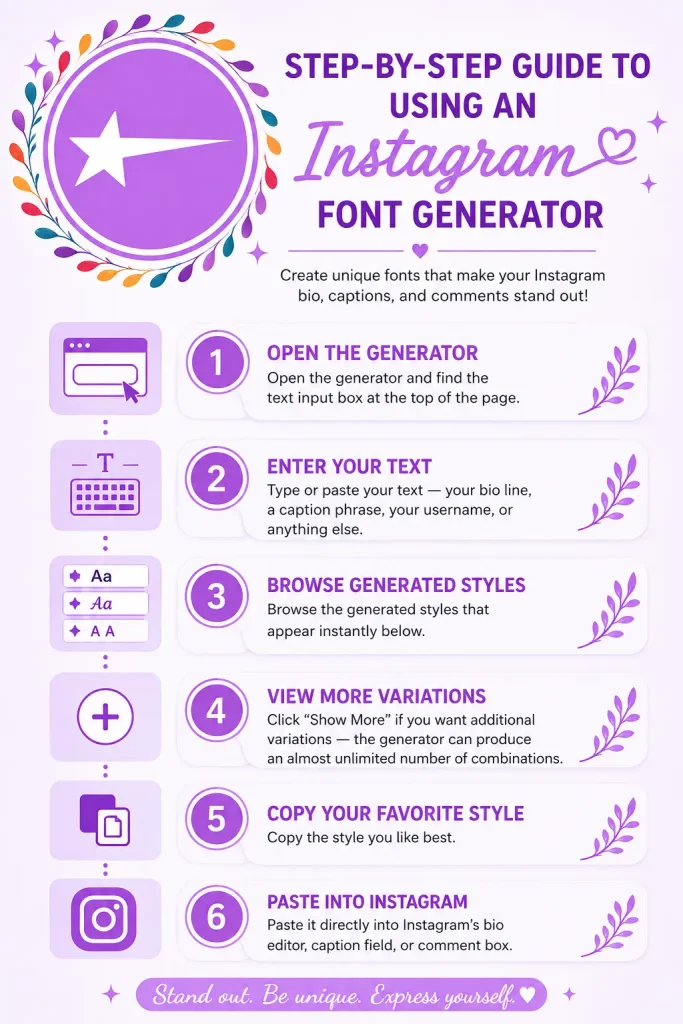
Step-by-Step Guide to Using an Instagram Font Generator
The process takes less than a minute:
Step 1: Open the Generator
Open the generator and find the text input box at the top of the page.
Step 2: Enter Your Text
Type or paste your text—your bio line, a caption phrase, your username, or anything else.
Step 3: Browse Generated Styles
Browse the generated styles that appear instantly below.
Step 4: View More Variations
Click “Show More” if you want additional variations—the generator can produce an almost unlimited number of combinations.
Step 5: Copy Your Favorite Style
Copy the style you like best.
Step 6: Paste into Instagram
Paste it directly into Instagram’s bio editor, caption field, or comment box.
That’s it. No account, no software, no complicated steps.
Where Can We Use These Types of Fancy Text Styles?
Instagram Bio
Your bio is a very important space to show your style and make a good impression. A well-styled bio immediately communicates personality, professionalism, or creativity—whichever fits your brand. Using a mix of bold keywords and elegant script can make your bio both readable and visually interesting.
Captions
Long captions benefit from styled text to break up information. Bold a key phrase at the start to hook readers. Use small caps for a polished closing line.
Comments
Stand out in busy comment sections under viral posts. A unique text style draws the eye and can boost your visibility.
Stories and Highlight Covers
While story text uses Instagram’s native fonts, styled Unicode text can be added to highlight cover descriptions and profile elements.
Username and Display Name
Some styles work beautifully in display names, adding flair without breaking readability.
Do These Work on iPhone and Android?
Yes—completely. Because it is standard Unicode text, it displays and works properly on both iOS and Android devices. There’s no app to install, no compatibility issue, and no difference in how the characters render on different devices. Whatever style you copy on your phone will look exactly the same when posted.
A Note on Compatibility
While the vast majority of generated styles work perfectly on Instagram, the platform does occasionally filter out certain heavily decorated characters—particularly those used in extreme glitch and zalgo styles. If a style doesn’t paste correctly or disappears after posting, simply go back to the generator and try a cleaner alternative. There are always plenty of options.
Tips for Getting the Most Out of Stylish Text
Don’t Overdo It
One or two styled elements in a bio look intentional. An entire bio in glitch text can feel overwhelming and reduce readability.
Mix Styles Thoughtfully
A bold heading line paired with clean regular text for the details often hits the sweet spot.
Test Before Publishing
Paste your styled text into Instagram’s edit screen before saving to make sure it renders correctly.
Combine with Emojis
Unicode symbols and emojis come from the same standard, so they pair naturally. A few well-placed emojis alongside styled text can elevate the overall look.
Match the Aesthetic to Your Niche
A luxury fashion account and a gaming community call for very different text personalities.
Frequently Asked Questions
Final Words
Personalizing your text is one of the simplest, most accessible ways to give your Instagram presence more character. With a free font generator, you can go from a default-looking profile to something that genuinely reflects your personality or brand identity — in under a minute.
Try different styles, combine them, and choose what suits you best.